Fonts
For headings
The font Technacy uses for headings is PX Grotesk, in its Light and Bold weights, chosen for a clean, modern style consistent with the company's visual identity.
It is currently used on the company website, in official documents and in presentations.
Download the font to use it on your computer
For web projects
The font can be used on web projects in web-compatible formats (.woff, .woff2) through the CSS @font-face rule.
To use @font-face, define the source of your custom font and specify how it should be used in your CSS styles.
Download the web files and a demo here.
@font-face {
  font-family: "Px Grotesk";
  src: url("../fonts/PxGrotesk-Light.woff2") format("woff2"),
      url("../fonts/PxGrotesk-Light.woff") format("woff");
  font-weight: normal;
  font-style: normal;
  font-display: swap;
}

@font-face {
  font-family: "Px Grotesk";
  src: url("../fonts/PxGrotesk-Bold.woff2") format("woff2"),
      url("../fonts/PxGrotesk-Bold.woff") format("woff");
  font-weight: bold;
  font-style: normal;
  font-display: swap;
}

body {
  font-family: "Px Grotesk";
  font-weight: normal;
}

b,
strong {
  font-family: "Px Grotesk";
  font-weight: bold;
}
Only when PX Grotesk cannot be used, the alternative Google font is IBM Plex Sans, available at this link, where you can install it with the options Google provides.
For body text
The font Technacy uses for body text is Inter, in its Regular, Bold and Italic styles. It was chosen for its modern, readable look that still feels professional and technological.
It is currently used on the company website and, also for headings, in social media graphics.
Download the font to use it on your computer
For web projects
The font can be used on the web in a compatible format: see the guide
When the company font cannot be used
When we cannot use the company font, because we don't know whether recipients have it installed or whether the software or medium supports it, it is essential to choose a universal font available on all operating systems. In these cases, Technacy has chosen Arial for its communications.
Choosing Arial as the default font when the specific company fonts, such as PX Grotesk or IBM Plex Sans, cannot be used is a sensible way to ensure effective and consistent communication for all recipients.
Change or set the default font in Outlook (macOS)
Installing fonts
Embedding fonts in Microsoft Word for PDF export
If you are working on a document in Microsoft Word, the font may not display correctly after exporting to PDF on a device that does not have the same font installed.
To make sure the right font is always displayed, follow these steps.
On macOS, open the document you want to create or edit in Microsoft Word
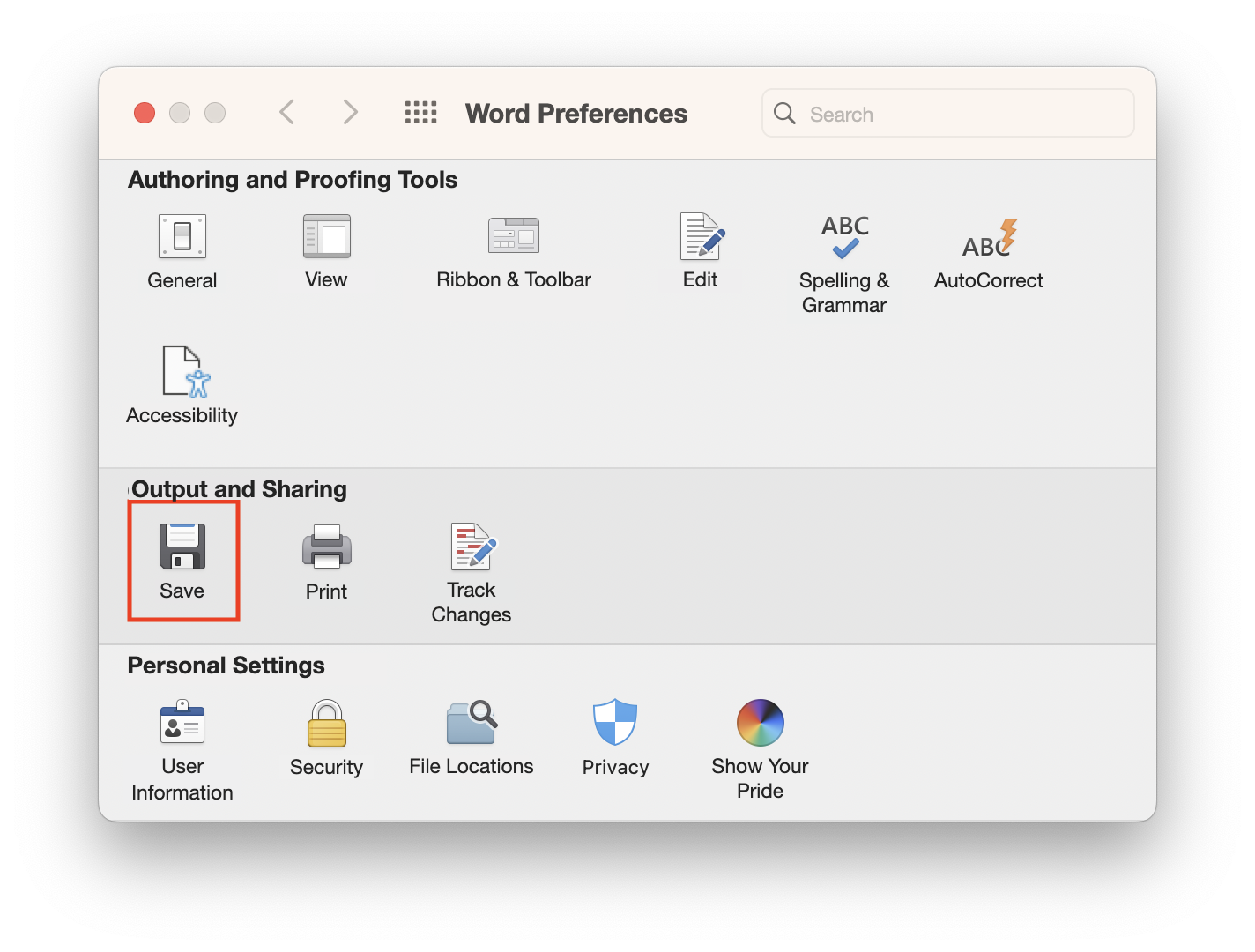
From the menu bar, click “Word”, then “Preferences”
In the “Word Preferences” window that opens, choose “Save”…
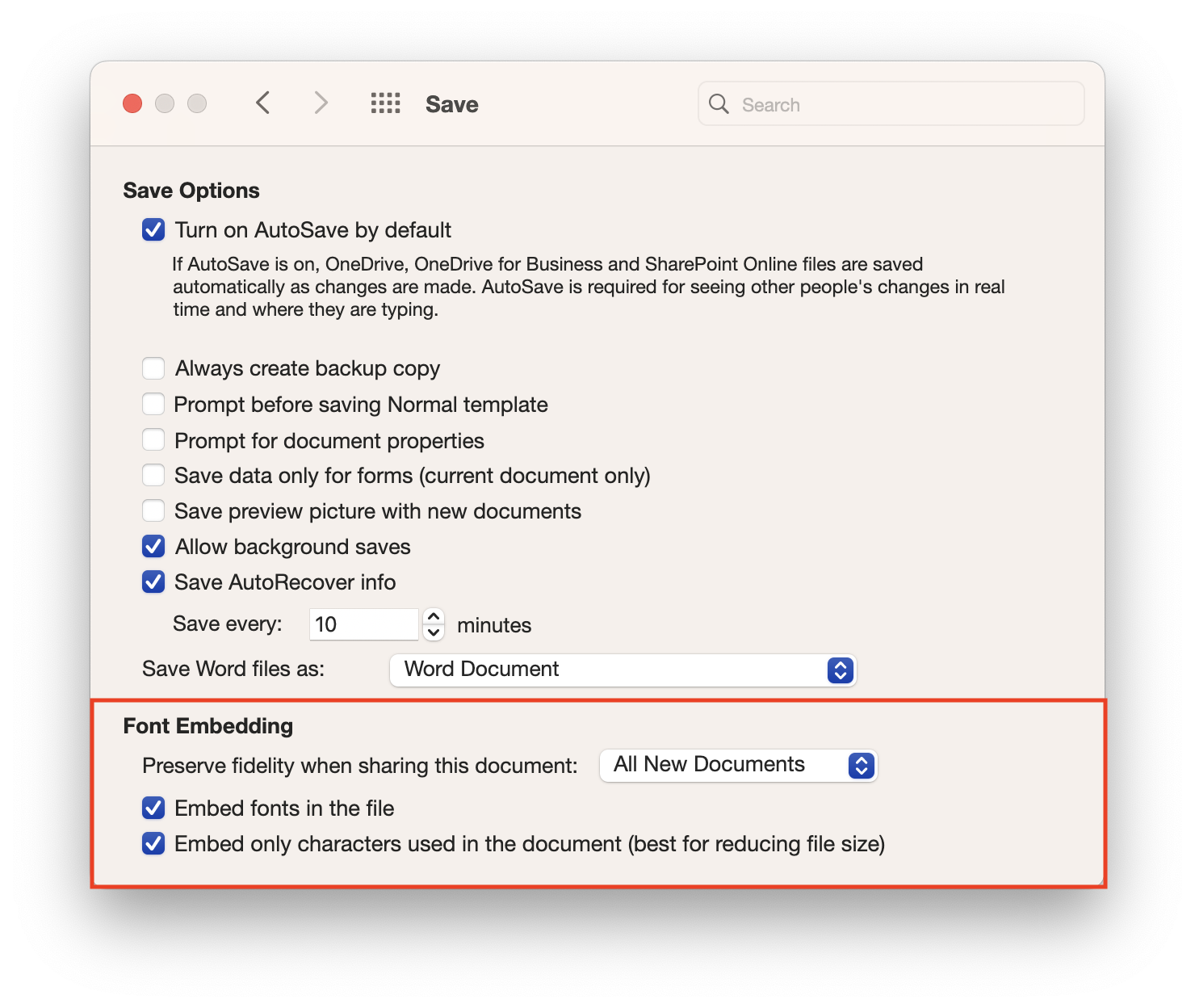
Tick the options:
• Embed fonts in the file
• Embed only characters used in the document (best for reducing file size)
Select “All New Documents” in the “Preserve fidelity when sharing this document” drop-down menu so that the current document and future ones keep these settings.